







WebVine Blog

SharePoint in Teams

“We believe in a future where there will be a Copilot for everyone and everything you do.”

- Satya Nadella

The curtains have drawn on Microsoft's largest annual conference, Ignite 2023. Under the visionary leadership of Chairman and CEO Satya Nadella, Ignite wasn't just a showcase of new products; it was a manifesto for a future powered by AI. In his opening remarks, Nadella outlined Microsoft’s commitment to democratise AI, making its capabilities accessible to everyone.
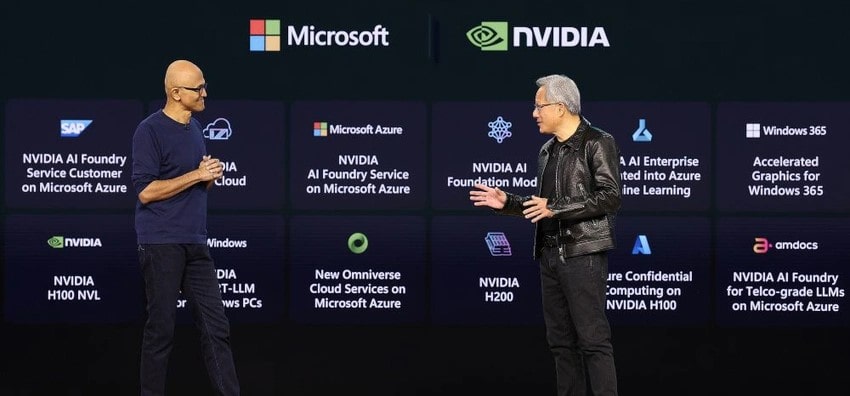
Satya Nadella and Jensen Huang at Microsoft Ignite 2023

Here’s a wrap up of some of the highlights from this year’s Ignite.

It’s All About Copilot

Not familiar with Microsoft Copilot? Been living under a rock? Never fear, we’ve got you covered with our Copilot explainer. Copilot was the main course at this year’s Ignite with a raft of announcements across the broad range of products that Copilot touches.

Copilot comes at a significant additional cost per user. To help support its use, Microsoft has announced the Copilot Dashboard, powered by Microsoft Viva. This is designed to help clarify how Copilot impacts the organisation and changes the way people work. This dashboard can also be used to plan Copilot readiness, drive adoption and measure overall impact.

To make Copilot more accessible, Bing Chat and Bing Chat Enterprise will now become Copilot. This is currently in preview and will become generally available from December 2023.

To further extend Microsoft 365 Copilot, we will have the ability to build custom AI capabilities via Microsoft Copilot Studio. This can be customised to include datasets, automation flows and even custom copilots.


Say Hello to SharePoint Premium
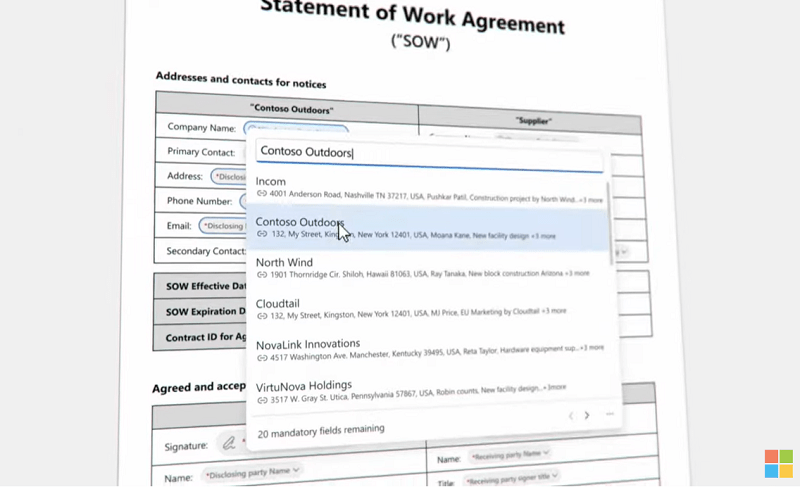
SharePoint PremiumMicrosoft has unveiled SharePoint Premium, an AI-driven solution set to revolutionise content management and enhance content experiences. Designed to seamlessly integrate with Copilot, it introduces content experiences that support information workers by enabling discovery, interaction, and collaboration across various file types, enriched by AI analytics and branded document packaging.

SharePoint Premium is currently being previewed and is slated for general release early 2024.


Even More Teams Features

Immersive spaces will be introduced into the Teams platform and made generally available in January 2024. Currently in preview, immersive spaces enables users to transform 2D meetings into 3D experiences with the aid of avatars, spatial audio, seat assignments and audio zones which will allow users to have multiple simultaneous conversations without talking over each other.

Mesh for Teams (which we covered as part of Ignite 2022) will become generally available in January 2024. Users will be able to create custom spaces for events, trainings, tours and product showcases. It will also be easier for hosts to interact with attendees, for example facilitating a Q&A session by enabling attendees to raise hands.

Microsoft will also be rolling out a heap of new Teams meeting features including AI-driven voice isolation, background decoration and chat features including group chat profile pictures and forward chat.

Introducing Microsoft Fabric

Brand new and available now, Microsoft Fabric changes the way teams work with data, bringing everyone together on a single, AI-powered platform, creating an integrated and simplified experience. Microsoft Fabric will have deep integrations with Microsoft 365 applications and copilots to enhance analytics capabilities and scale data value creation.

A New Microsoft Planner Experience
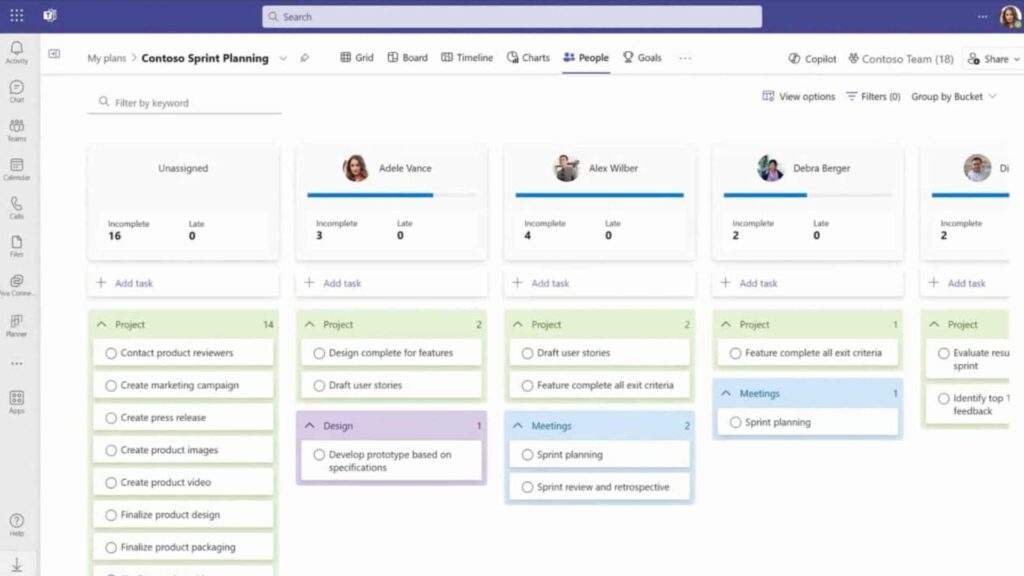
New Microsoft Planner

To deliver a singular, unified task and project management experience, Microsoft is bringing To Do, Planner and Project for the web into one place, under the umbrella of Microsoft Planner. The new Planner experience will be more collaborative, scalable, and assisted by next-generation AI to help everyone manage their work and achieve business outcomes. This is expected to become available in Autumn 2024, followed by the web experience later in 2024.

Microsoft Loop Application Now Available

Microsoft Loop is now generally available for use on desktop and mobile. Here’s a reminder on what it’s about from its initial announcement at Ignite 2021.

Recent improvements and new capabilities include status and descriptions for workspaces, the ability to create workspaces from Teams and an integration with Power Automate.

More Updates from Microsoft Ignite 2023

For a full list of updates from Microsoft Ignite 2023, check out the Microsoft Ignite 2023 Book of News. There are so many exciting updates! If you’re unsure where to start or want to learn more about any of these updates, get in touch with WebVine.

AI Capabilities

The rise of generative AI has been meteoric with the launch of new technology like ChatGPT making waves across industries. It’s estimated that at its current level of capability, generative AI has the potential to automate or augment 44% of tasks on average.

With Microsoft’s own proprietary AI technology, Copilot, soon to be launched, we are at an exciting turning point. However, many organisations have not yet recognised the breadth of capabilities that AI will offer and how it can be applied to different business functions.
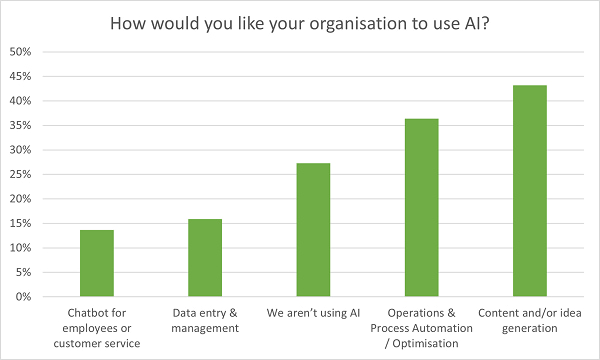
 

Chart


According to a recent poll conducted by WebVine on ‘Getting Ready for Microsoft Copilot’, 43% of organisations are currently using AI for content and/or idea generation. This only scratches the surface for what generative AI can achieve and as new technology, like Copilot, becomes readily available, organisations will have a wider scope to drive productivity.

A whopping 68% of knowledge workers agree that generative AI has the potential to help in their roles. Let’s take a closer look at some of the ways we can leverage generative AI.


Idea and content generation

Generative AI systems like ChatGPT can analyse vast amounts of data, generate ideas and produce content. Microsoft Copilot will also pull from your organisation’s data, including financial reports and presentations, to help with ideation and content creation.

Need to do some brainstorming? Leverage AI to generate new ideas for articles, web copy, emails, ad copy, product concepts and headlines. Remember that the prompts you use will significantly influence the outcomes you receive. One effective technique is to create a persona for the AI generator, including knowledge & experience, writing style, format and intended audience eg “Acting as a legal expert: What are some pain points law firms use with their content marketing to educate clients and attract new businesses?”

For content creation, AI can quickly generate written articles and web copy as well as design graphics and even compose music. This can be a huge time saver, however it’s essential to carefully review any output to achieve consistent and high-quality results.


Automating tasks and processes

AI’s ability to interpret and action content opens a world of possibilities for streamlining operations. AI automation can assist with scheduling such as creating and sending reports and summaries.

Or take the process of onboarding a new staff member: AI will be able to intuitively welcome a new employee; from collecting and storing details, ensuring the review and attestation of important policies to building a skills matrix for tailored learning and development.


Help with decision making

Generative AI can also play a significant role in decision-making. By accessing and reviewing organisational data, AI technology like Copilot can provide insights and recommendations, helping businesses make informed choices. For instance, in a retail context, AI could analyse customer data and identify noteworthy customer segments such as those at risk of churn or representing repeat purchase opportunities.


Data management

Organisations are often inundated with unstructured data, much of which is never used. With some learning and guidance, AI can be instrumental in ingesting, identifying, categorising, tagging and analysing data, even from inconsistent source formats.

AI can then use this data to generate reports, summarise large datasets and even predict future trends. What previously might have taken days or weeks can now be done in a fraction of the time.


Workplace chatbots

One of the special features of Microsoft Copilot is the new business chat function which will operate as a far more advanced office assistant (remember Clippy?). AI virtual assistance can be incredibly useful in helping employees to work more efficiently by surfacing information & insights and carrying out tasks. It will access a vast amount of information and can generate responses that mimic human conversation.
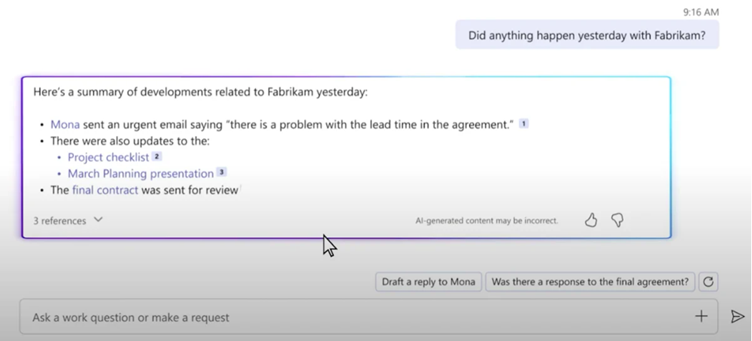
Copilot chat


Current Limitations of Generative AI

As many exciting new features and developments become available, it's important to acknowledge the current limitations of generative AI. While AI can help with a variety of tasks from content generation to automation, it can lack the deeper understanding, context and reasoning abilities that humans possess. This limitation can lead to inaccuracies, biases and misinterpretations, which are critical areas that still require human input. AI is still in its infancy, so as the technology continues to learn and evolve, so will the quality of output.

On the AI journey, organisations must carefully manage privacy and security issues, as well as ethical considerations around information bias and ensuring transparency and accountability for AI decision-making.


The Road Ahead

As generative AI continues to evolve, its capacity to automate holds the promise of increased efficiency and productivity across almost every industry.

Our recent webinar “Microsoft Copilot: Getting Ready For Workplace AI” covers everything you need to know about preparing for Copilot. Watch it here.

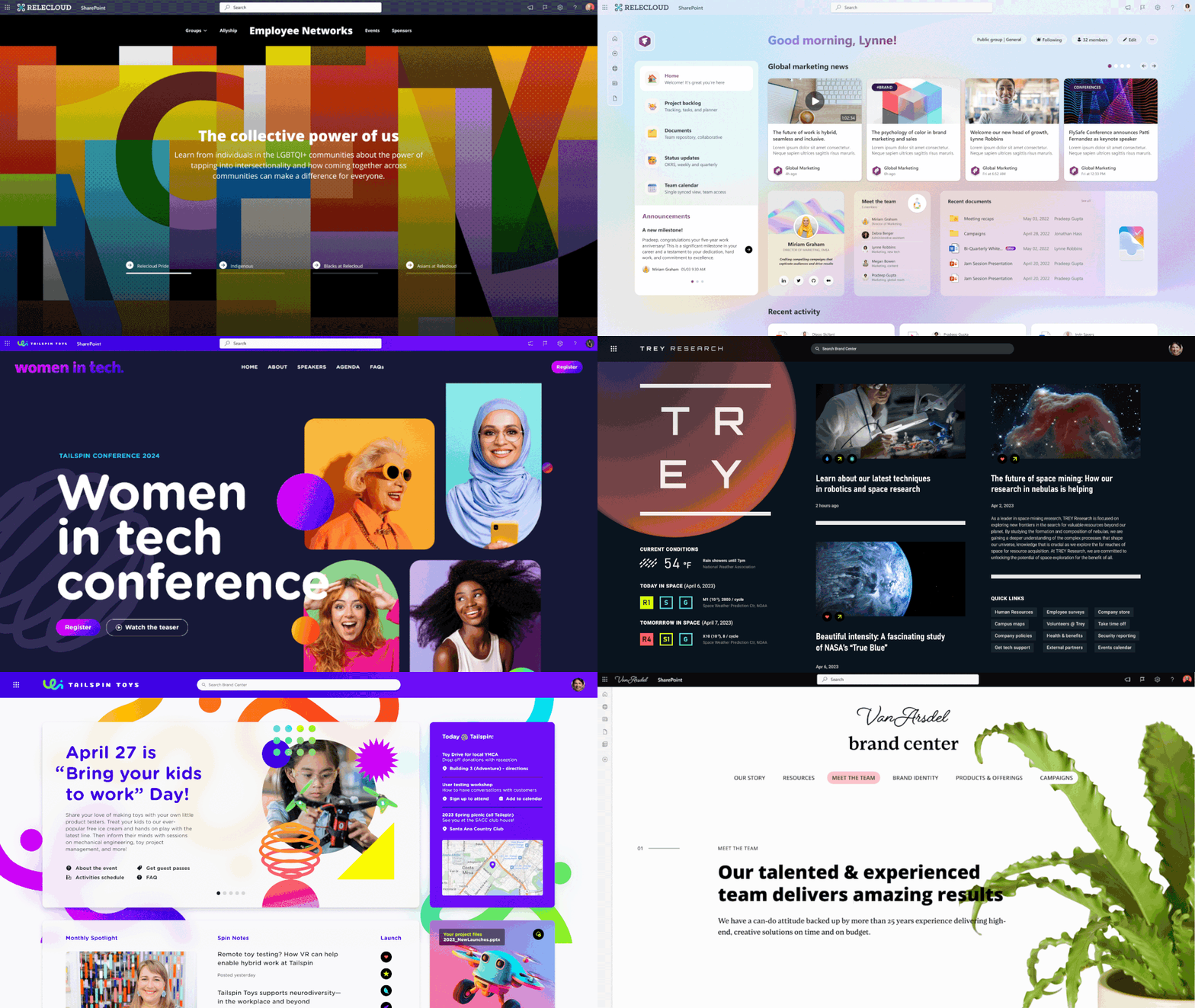
SharePoint in Teams

The average employee uses 10 different apps to complete their tasks every day and the more apps they use, the longer they spend feeling distracted or procrastinating1. That lost productivity can add up: an enterprise with 2,500 employees could lose 325,000 hours of productivity annually2. Not to mention the fact that we are all paying more for Microsoft 365 these days. Doesn’t it make sense to squeeze every drop of value out of the platform?

There are huge opportunities to better leverage Microsoft 365 to deliver the business services you need without:

  • Incurring another set of costs
  • Losing data sovereignty
  • Requiring more training and documentation
  • Reducing productivity via context switching


1) Slack VS Teams

Why are you still paying for Slack? Microsoft Teams is a juggernaut and Microsoft just keeps adding more features, additional integrations and greater customisations. Teams provides an uninterrupted workflow within Microsoft 365, combining all collaboration tools and other M365 productivity applications in a single dashboard. It includes video and voice calls for up to 300 users for the paid plan and up to 20 users for the free plan, while Slack only offers one-to-one video and voice calls. Want to know about mentions and meetings but not likes or voicemails? Teams also offers more granular notifications options than Slack.

COST IMPACT: Paid Slack subscriptions (if you need more than 90 days history and meetings with more than one person) start at $11.35 per user per month.


1Asana's Anatomy of Work Index 2022
2Slack State of Work


2) Zoom VS Teams meetings

Microsoft Teams for remote & hybrid meetings really is the go-to for most organisations running Microsoft 365. It offers multi-factor authentication, breakout rooms and real-time collaboration on shared documents, as well as seamless post-meeting access to content through cloud services.

If you are regularly running webinars however, Teams may not deliver everything you need as it lacks promotional features including reminder emails. All participants can also see each other as well as access the chat. Zoom also seems to cope better with slower internet and the Enterprise option can accommodate 1,000 participants whereas Teams is limited to 300. If you are not running webinars – Teams is the obvious choice, but if you are, it may not cover 100% of your requirements.

COST IMPACT: Zoom for business costs AUD $310 per user per year.


3) Confluence VS Loop

Loop combines a powerful and flexible canvas with portable components that move freely and stay in sync across applications — enabling teams to think, plan, and create together.

- Microsoft

Many organisations use Confluence as an internal knowledge base system as well as a space to collaborate. Users can plan projects, form communities, share and discuss ideas, ask for recommendations and get feedback. But now we have Microsoft Loop: an “all in one” co-creation and collaboration platform. Loop is a blank canvas for teams and projects on which users can combine kanban boards, Gantt charts, wikis, To Do lists and comment boards. We can link pages together, seamlessly moving from one canvas to another so your files are always easy to find. It might take a while to get used to but Loop offers a flexible and compelling alternative to Confluence.

COST IMPACT: If you have more than 10 people in your organisation, Confluence will set you back $8.70 per user per month. Loop is currently in free preview but may attract costs in the future.


4) Trello VS Planner

Microsoft Planner and Trello offer solutions for project and task management. Both tools are based on the idea of card-based kanban boards rather than traditional task lists, creating a digital version of a physical board with various Post-It notes tracking tasks. You can create tasks as cards and assign them to team members, then use comments to communicate with stakeholders.

As part of the Microsoft 365 suite, Planner integrates with a range of apps to help your team tackle just about any job together. Trello is a simpler tool that delivers a narrower range of features.

COST IMPACT: While there is a free Trello plan, business users will need at least the standard plan at $5 per user per month.


5) SharePoint/OneDrive vs DropBox

As a web-based collaborative platform, SharePoint excels at document management, file sharing and team collaboration, enabling users to store and share files securely within an organisation. The organisation can access 1 TB of storage within SharePoint, plus 10 GB of additional space with each additional license.

Dropbox offers cloud storage and sharing, eSignature, document tracking and backup, but lacks the richness of the SharePoint interface which can include images, video, polls and other interactive and engaging features.

COST IMPACT: The Standard business Dropbox plan is $277.20 per user per year.


6) Power BI vs Tableau

As part of the Microsoft Power Platform, Power BI is a business analytics tool that provides interactive visualisations and business intelligence capabilities. It can be used to analyse data and share insights across an organisation, serving as a potential alternative to Tableau for data visualisation and reporting.

COST IMPACT: Realistically, Tableau is a fairly comprehensive offering with a multitude of customisations so it’s unlikely that you are accidentally spending $59 per user per month.


7) Microsoft Forms vs Survey Monkey

Microsoft Forms allows you to create surveys, quizzes, and polls quickly and easily. It offers a user-friendly interface, data analysis capabilities, and integrates well with other Microsoft 365 apps. This makes it a viable option for replacing third-party survey tools like SurveyMonkey or Typeform.

COST IMPACT: Minimal. The free version of Survey Monkey offers adequate functionality for most uses. The real benefits are security and integration with the M365 family.


8) Notion vs OneNote

OneNote and Notion are information repositories, allowing your team to create, organise and share notes about clients, projects, products – whatever your business needs. Both tools enable real-time collaboration allowing multiple users to work on the same note simultaneously.

OneNote is tightly integrated with Microsoft Office suite and notes are easy to organise, stored in a hierarchical structure with notebooks, sections, and pages. It can even support digital ink with multiple pen thicknesses and shape rotation for users who prefer handwriting or sketching. Dictate or hand write your notes and the OCR feature will transcribe to searchable text.

Notion allows users to create databases, templates, to-do lists, and kanban boards as well as supporting rich media such as embedded files, images, videos, and code snippets. Notion is endlessly customisable but that can be its biggest downfall, resulting in constant tinkering and building without actual work getting done.

COST IMPACT: Notion business plans start at $11.80 per user per month if you pay annually.


9) Power Apps/Power Automate vs everything

Business process management software is a hot topic, and many organisations are seeking user friendly, time saving software solutions. Using solutions with low or no-code app development helps business users proactively automate their processes without waiting for IT to have the capacity to help.

It’s not practical to compare them all but some of the apps that can potentially be replaced by Power Platform are:
Power Apps: Appian, Quickbase, Mendix, APEX,
Power Automate: Appian, Nintex, Kissflow, Laserfiche

COST IMPACT: As an example, Quickbase starts at USD$35 / user per month, up to $55 for business plans. Appian has a free version but paid business starts at $75/user.


10) Grammarly vs Word

Microsoft Word and Grammarly are both valuable tools for writing, but they can serve different purposes and offer distinct benefits. You probably know that Microsoft Word includes built-in spelling and grammar checking capabilities. But did you know Word also offers other features like autocorrect, synonym suggestions and readability analysis? It can identify complex sentences, passive voice and overused words.

While Grammarly offers more advanced features and in-depth writing analysis, Microsoft Word can be as helpful for most users for basic spelling and grammar checking, formatting, and seamless integration within the Microsoft Office ecosystem.

COST IMPACT: The business plan for Grammarly is $21 per user per month which includes 1,000 prompts per month + company style guides.


Ultimately, the choice between Microsoft 365 apps and their more specialised counterparts depends on user skills and preferences, platform compatibility and most frequent use cases. If your team members are handy with a process flow but need a bit of help crafting effective communications, maybe pay the extra for Grammarly. Are you running complex data analysis with an internal BI team? Perhaps you need the extra boost of Tableau.

Microsoft 365 offers a lot of good stuff that you might not be using. Before signing up for ANOTHER SaaS product, check if you are already paying for the same thing with Microsoft 365.

Need more M365 ideas? Request our guide to quick, low cost projects you can knock out before Christmas.

SharePoint in Teams

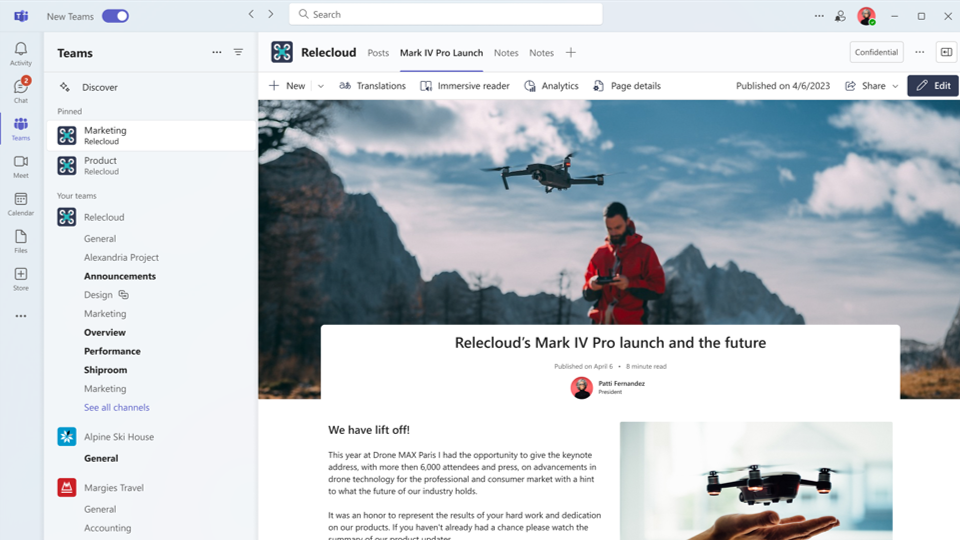
Microsoft recently announced some of the biggest updates to SharePoint since the move to modern. WebVine's Head of Service Delivery Alan Hinton takes you through the third major change relating to design and the creation of more 'compelling content.

Hello everyone. Alan Hinton here from WebVine. Really excited to share with you the latest announcements from Microsoft on SharePoint. Just a reminder, we have two other videos that look at Microsoft Copilot & Co-authoring and deeper engagement, but we're going to be focusing on design.

Microsoft has listened to the feedback that has been given from many users around the look and feel of SharePoint. SharePoint can be limiting when it comes to design, more specifically elements like fonts, branding, imagery, and other important design aspects.

When it comes to creating a SharePoint environment and working there, Microsoft users will have access to a hub where all the typography, imagery and other design elements will be available. These elements can then be used to overlay onto your existing sites. So I'm excited to see where this leads as being an intranet provider, WebVine are very much focused on design and the intranet experience. This extends  our ability to work in this environment and bring great features to our clients and to anyone that we happen to cross paths with.

If you want to find out more about how how you can use these new SharePoint features to better communicate in your organisation, get in touch.

SharePoint in Teams

Microsoft recently announced some of the biggest updates to SharePoint since the move to modern. WebVine's Head of Service Delivery Alan Hinton takes you through the second major change relating to ‘deeper engagement’.

Hello everyone. Alan Hinton, Head of Service Delivery at WebVine. I'm really excited about the SharePoint changes that have recently been announced by Microsoft. Just a reminder that this is the second video in our series. I do encourage you to go back and take a look at our first video on Simply authoring.You will definitely learn some things from that.

All right, let's focus on this second major update. So we're going to focus on deeper engagement. Deeper engagement is all about the concept and the problem that internal communications people have with getting their message out to the multiple places that people are working. People work in email, they work in teams, they work all over the place. This is an internal communications specialist's worst nightmare.

So Microsoft has listened to this and put in new enhancements in the SharePoint platform to be able to deal with this. This is broken down into three key areas.

The first one is when you're publishing Microsoft News, you have the ability to weave this into an email, so it's still a Microsoft News SharePoint post, but just in an email. This is going to make internal communications people's lives much easier.

The second thing is weaving and connecting SharePoint to Teams, as this is where a lot of employees are spending their days . It's going to make communicating to these individuals much easier. So when people are in teams, they will actually be able to see and engage with their intranet or communications platform.

The third thing is the incorporation of Microsoft SharePoint into Viva Engage. So if you're in Viva Engage and you're playing around and looking and working through different things, you will also see news posts that are published there.

It's a really powerful set of features that are coming to Microsoft SharePoint, and we're very excited for these as we've been getting feedback on this from clients for many years now.

If you want to find out more about how how you can use these new SharePoint features to better communicate in your organisation, get in touch.

Transformational Technology Wins

As the financial year comes to an end, are you feeling like there was more that could have been achieved from your IT wish list, leveraging technology to improve processes, productivity and overall employee experience? There’s still time left to hit some home runs with any remaining budget. Whether you wish to say farewell to frustrating, repetitive manual forms or want to clean up your Microsoft Teams environment, there are several options that won’t break the bank.

Get inspired and tackle one of these projects to finish this financial year with a win. We guarantee your colleagues will love you for it.


Digitise forms or processes

It’s surprising how many organisations are still printing, signing and emailing forms like leave requests, employee expenses and purchase orders. Not only does this create opportunity for manual errors, but it’s time consuming and repetitive for employees.

You can automate forms and create process workflows to send automatic reminders, track approvals and guide users using the capabilities of Microsoft 365.
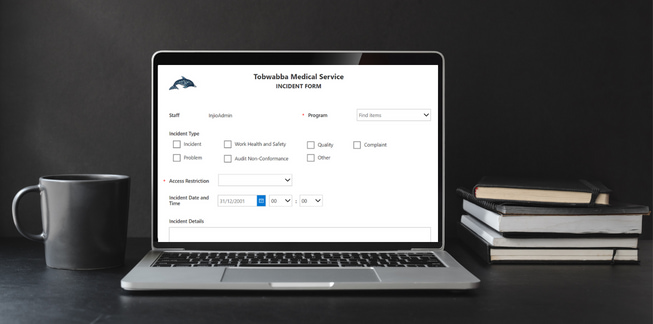
 

RAMS Example E-Form
Regional Aboriginal Medical Services (RAMS) use SharePoint Lists & the Microsoft Power Platform to optimise their forms.


Single source of truth

While a full document management project might be unrealistic, you can address priority issues like compliance and risk management. Get your most important documents in order by conducting an audit, eliminating superfluous versions and creating a centralised hub where final approved documents can be accessed and managed.

Document home page experience for the Great Barrier Reef Marine Park Authority making it easy to navigate and find documents via a rich search experience.


Clean up Microsoft Teams

Has your Teams environment become painful and unruly? You may be suffering from Teams sprawl, with users creating and abandoning Teams and Channels unchecked. Teams sprawl impacts not only the usability of the platform, but has security implications, making it difficult to effectively manage and monitor access. With customised support, WebVine can help get your Teams structure back in shape and minimise further issues.
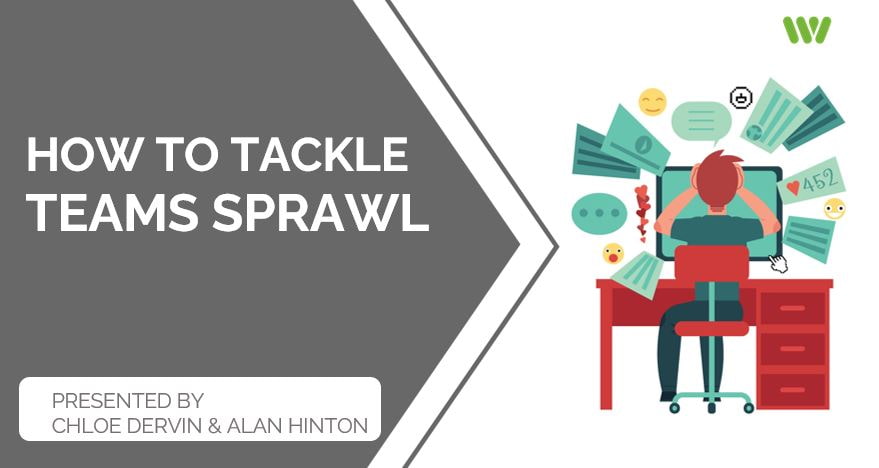
 

Webinar - Teams Sprawl
Get started with our webinar on how to tackle Teams Sprawl.


Training and workshops

Technical skills training is a smart budget allocation option. It will increase productivity, reduce calls to helpdesk and employees will value the opportunity for development. If your organisation is lacking in internal expertise, why not get a third party expert in to help lift your business capabilities. Consider breaking training down by:

1. Application upskilling
Is there a Microsoft 365 application like SharePoint, Teams or the Power Platform that your internal teams are not using effectively? WebVine offer bespoke training that is flexible, practical and interactive.

2. Adoption, governance and other strategic initiatives
While you might have a full digital workplace including a sparkling intranet, perhaps employees are still not as engaged as they could be. WebVine can work with you to shape and execute a strategy to drive user adoption and engagement, delivering return for your technology investment. If your organisation is lacking a proper governance framework, putting valuable data and technology at risk, we can work with you to create and implement best practice plans.

3. Citizen development
With citizen development on the rise, many organisations are looking at their everyday staff to drive new innovation and change.
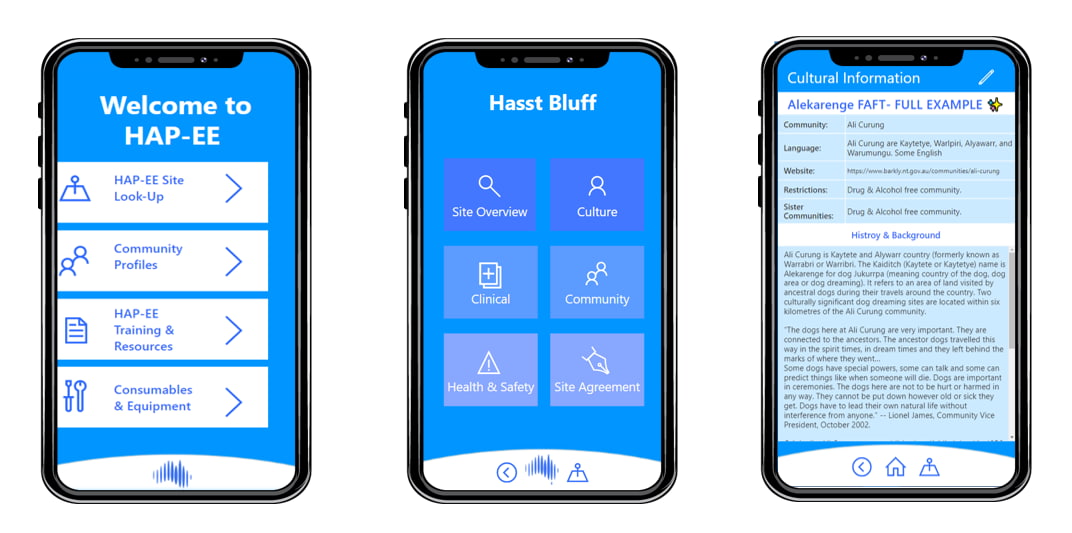
Field Outreach App
WebVine provided technical support to Jacqui Peck, an audiologist with Hearing Australia, to help create a comprehensive solution consisting of a central model-driven app that works as a CRM system capturing information in the Microsoft Dataverse database.


Intranet optimisation

How healthy is your intranet? Are people using it? Instead of making your intranet next financial year’s problem, why not get a head start and look at what can be done to optimise it now by:

  • Refreshing the design
  • Integrating with Teams
  • Adding a new module to address a business problem
  • Revamping your staff directory

WebVine are intranet experts. With over 12 years of experience, we know what works and we have the technical skills to deliver. Get in touch for a free consultation.


Document migration

Enough is enough. It’s time to get your documents into the cloud. Engage a professional to do this right and ensure minimal business disruption. Your executive team (and colleagues) are sure to be impressed.

Learn more about why we’re the experts in document migrations.


It’s time to get started

These options are only the beginning, but trying to do everything will almost certainly result in hair loss. The key is prioritisation.

WebVine’s friendly team of consultants is here to assess your business needs and help you prioritise. Our proven system ensures the most valuable projects are completed first, and helps to manage stakeholders effectively and transparently.
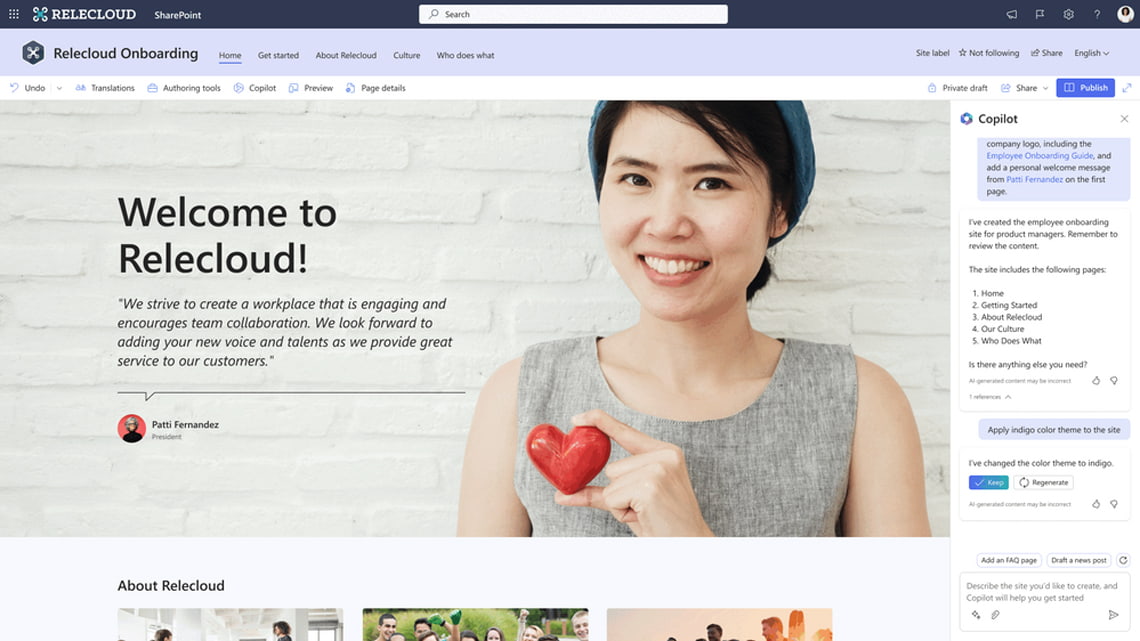

Contact us for an obligation free chat today.

Microsoft Copilot & Co-authoring

Microsoft recently announced some of the biggest updates to SharePoint since the move to modern. WebVine's Head of Service Delivery Alan Hinton takes you through the first major changes relating to ‘simple authoring’.

Hello everyone. My name is Alan Hinton. I'm head of service delivery at WebVine. WebVine is a digital transformation company specialising in all things Microsoft. Really excited to talk to you today about some major Microsoft announcements that are coming for the SharePoint platform. This is revolutionary.

There hasn't been an update like this since Microsoft moved from SharePoint Classic to SharePoint Modern. These changes are focused on the Microsoft platform, and they're broken down into four key areas.

The first one we're gonna talk about is simple authoring, and Microsoft has a number of different key areas for this. They're rolling out a system called Co-Pilot. Now, if you don't know what co-pilot is, think of it as your personal digital assistant that's powered by chat, GPT, like functionality.

The whole idea of this is to make it easy, fast and professional for you to be able to create content for sites and pages. Now it'll only get you about 80% of the way there. You'll still have to do your 20%, but it will make your lives easier and faster in this way.

The other area and the other feature that Microsoft are bringing out is a concept of page co-authoring. So the whole idea behind this is that you can create pages easily and efficiently with your colleagues and get those live and working quickly. It's going to make a huge impact . It's very similar to how you edit Microsoft Word documents.

If you want to reach out and learn more about how this could impact your organisation, get in touch.

Stack of books

To reconnect to the soul of our work, we don’t just need a better way of doing the same things. We need a whole new way to work.

Jared Spataro, Microsoft

Copilot is Microsoft’s new AI-driven personal assistant, allowing you to focus on the creative and the essential, streamlining mundane tasks and make work more efficient.

Microsoft used a lot of flowery words to introduce Copilot, but you can’t fault the intent: keeping work as efficient as possible to allow more time for what matters, whether that is teaching, learning, creating, solving or just enjoying a nice cappuccino with the newspaper.

What is Microsoft Copilot?
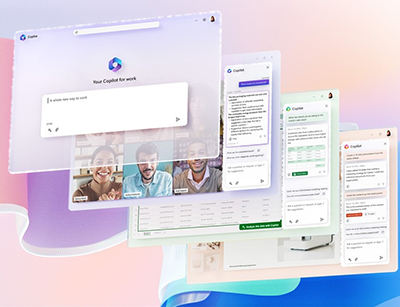
Microsoft describes Copilot as a co-worker, one that doesn’t nick your last yoghurt from the fridge.

It’s a new productivity tool designed to streamline and simplify your day. It’s an intermediary sitting between your Microsoft 365 apps (Word, Excel, PowerPoint, etc) and a natural language model, combining the power of artificial intelligence with applied practice to provide an intuitive and comprehensive platform.

Copilot offers recommendations on how to better manage workflow, adjusts priorities based on user feedback and habits, and actively seeks out improvements to increase efficiency.


What does it do? How will it impact my day?

Using advanced algorithms, it can detect inefficiencies and tactical errors, alerting users when those discrepancies are found. The system also takes interpersonal dynamics between team members into account and provides a platform to improve collaboration between workers who may not know each other well for example due to remote working.

You can use Copilot for:

  1. Business Chat – Use natural language prompts like “Tell my team how we updated the product strategy,” and it will generate a status update based on the morning’s meetings, emails and chat threads.
  2. Word – Flashing cursor getting you down? Copilot can give you a first draft to edit, potentially saving a lot of time. You can prompt Copilot to shorten, rewrite or give feedback.
  3. PowerPoint - Create beautiful presentations featuring graphics and animations with a simple prompt, adding relevant content from related documents INCLUDING Outlook and Teams.
  4. Excel – identify and analyse trends and create data visualisations in seconds. Use commands like “find our least profitable region” rather than =SUMIF(B2:B25,"<5")
  5. Teams – It can be difficult to simultaneously make notes and follow a discussion. Things can be missed. Teams Copilot can summarise key discussion points — including who said what — and suggest action items, all in real time during a meeting.
  6. Power Platform automate repetitive tasks and go from idea to working app in minutes. Will it be robust, accurate, bug free? Maybe not. But a working model is better than nothing even if you just use it to brief IT.
  7. Level Up. Most of us use only a handful of features from the thousands available across Microsoft 365. Now, you can use natural language to initiate action, rather than having to sort through a bunch of complex menu items and commands.


Won’t that be annoying?

Clippy

The idea of having an automated program providing step-by-step instructions on how to complete a task might sound helpful at first. However, nobody enjoys hearing 'Helpful hint' every few minutes, making us feel inadequate. Remember Clippy? A lot of people had strong feelings about Clippy. But with all the features Microsoft has added in, including personalised learning and smart suggestions, one can only hope that Copilot stays out of your way when you don't need it and isn't too intrusive when you do.


Is it secure?

As part of the Microsoft offering, we can be sure that Copilot has been engineered with a high level of security and privacy in mind. All data sent between you and the service is protected through secure protocols, and your end-user experience is encrypted for added safety. Two-factor authentication, compliance boundaries, privacy protections and more make Copilot more trustworthy than, say, ChatGPT. Though no service is ever impenetrable, Microsoft takes responsible steps to ensure your personal information remains safe when using Copilot.


Final verdict?

Microsoft Copilot has arrived and is set to revolutionise the way we work. It helps streamline our workflows; reducing time-consuming and mundane tasks, encouraging better interactions between colleagues, and providing accessible knowledge about the Microsoft Office tools. Put to use correctly, it can truly transform the way we do business today.

According to Microsoft, Copilot is currently being trialled by “20 companies,” but there’s no word on when the rest of us can have a go.

If nothing else, this is an astonishing demonstration of Microsoft’s progressiveness and ingenuity. Five months ago we were all Googling and writing our own copy like cavemen, now we have a whole ChatGPT ecosystem embedded within the tools we use every day. Impressive… and a bit scary.

Need help getting started? Get in touch with us today so we can optimise your Microsoft 365 environment. The power of a well-organised workplace should not be underestimated - let’s make the most of it!


Stack of books

SharePoint is used by over 200 million people worldwide, and this will only grow as more organisations look to leverage this powerful, secure, scalable platform.

Fast, accurate search is one of the most important elements in SharePoint. If search is not an explicit consideration, the user experience can be compromised. People start complaining that search results are wrong, or slow, then start saving documents onto their personal drives, circulating new versions and exacerbating the problem.

This is not conducive to a calm and productive day.

Setting up SharePoint for effective document management and optimal search is not complicated, but – like baking a decent cake – certain conventions must be observed.

1 – Clean house

Are obsolete, duplicated or badly-filed documents slowing down your search and delivering confusing results? Do you suffer from inactive sites and forgotten pages? SharePoint search will never function properly when it has to sort through huge volumes of junk.

This stage can often be the most painful, but it is absolutely the most necessary and effective step towards SharePoint search nirvana.

2 – Review your information architecture

Perhaps your data structure has evolved organically over time as new business units and clients were created. Maybe it was carefully designed but needs to be scaled and reinforced to support growth.

Effective SharePoint search requires a clear and intuitive information architecture:

  1. Structure - Create a logical hierarchy with libraries, folders, metadata and content types.
  2. Metadata - SharePoint uses metadata to search efficiently, using key elements like author, date, topic and document type.
  3. Indexing - A database index is a structure that makes data retrieval faster. An indexed column in SharePoint is used to provide faster, more specific results.
  4. Permissions - Set up appropriate permissions and access controls to ensure that all users have the appropriate level of access.

3 - Version control

SharePoint has several features to help manage documents and surface the latest information. The following settings can be configured in SharePoint document libraries:

  • Versioning is the way new iterations of a document are numbered and saved.
  • Content approval is how approvers control the publication of content.
  • Check-out and check-in are the methods to control when a new version of a document is published.

4 - SharePoint Search Results

Well-presented search results make content easier to find. Use these settings, scopes and verticals to help users find what they are looking for:

  • Configuration: Confirm which content should appear in search results and update your search settings accordingly.
  • Search scopes: Users will see results from your current site by default, but you can expand the scope to the include the parent hub or to the whole organisation.
  • Search verticals: The tabs on the search results page show results according to category or “vertical”. Consider if the current ones are working and change if not.
  • Results Display - Display templates can help visually filter results by highlighting document type, file name, summary text or a preview pane.
  • Permissions: Setting the right permissions ensures that SharePoint search results present the appropriate documents and sites for each user.

5 – Governance

While Governance is not the most exciting dinner party topic, it will protect your precious SharePoint sites, pages and document libraries, preventing them from descending back into chaos. Your governance document does not have to be long, but it should cover:

  • Security: How are your documents protected + guidelines for data encryption, backup and recovery.
  • Training: Any recommendations for training on SharePoint document governance best practices including frequency.
  • Document Management Policies: How documents should be created, approved, managed and archived.
  • Access Controls: How permissions are granted or revoked including role changes, onboarding and offboarding.
  • Document Retention: Define the document lifecycle for major document types: retention, review, destruction or archive.

Effective SharePoint document management takes effort to set up and maintain, but we promise the impact will be significant, with accurate, up to date, trustworthy SharePoint search results boosting productivity and eliminating a major source of frustration.

Need help? The friendly WebVine team have dealt with some very scary SharePoint document disasters, we can definitely handle yours. Sometimes it’s helpful to introduce a third party SME to prioritise and keep stakeholders accountable. However we can help, please get in touch today.

SharePoint consultants at work

Over the past 40 years, the role of the CIO (Chief Information Officer) has changed from being highly technical and focused on the management of IT systems, to one that is more strategic and centred around how IT drives business transformation. Today’s CIOs are required to be visionaries, leaders and tacticians, working with their executive team to drive innovation and create opportunities for revenue generation. According to the 2022 State of the CIO report, 74% of heads of IT say that the CIO role was elevated due to the pandemic and this visibility within the organisation is expected to continue. No longer have CIOs been relegated to the background of an organisation, but are at the forefront of change, leading the charge for new digital initiatives.

Driving digital transformation

To keep up with the competitive pace of technological change, organisations need to be agile and constantly evolving. At the helm of this transformational change is the CIO. 84% of CIOs are more involved in leading digital transformation initiatives compared to their business counterparts. The CIO must act as a key business strategist, working with the executive leadership team to implement initiatives that are increasingly being viewed as critical to business survival. With an estimated 70% of digital transformation projects falling short of their objectives, the CIO needs to work hard to not only provide a clear vision, but to secure buy in from the CEO through to middle management

Key skills defining successful CIOs

With a shift away from a purely operational focus, CIO’s need to be developing and working on an array of non-technical and softer skills to ensure they’re able to meet their changing role requirements.

People Management

Close to the top of the list should be a strong focus on people management. This not only extends to employees within a CIO’s internal teams, but to stakeholders across the business, that CIO’s need to inspire and sell into their vision.

Adaptability

CIOs that will thrive and demonstrate their value to an organisation are the ones that constantly innovating and challenging the status quo. With 86% of CIOs saying that their role is becoming more digital and innovation focused, it’s important that CIOs are able to move quickly in response to environmental changes (the Covid-19 pandemic was a prime example of this) and seize new market opportunities.

Strategic Thinking

According to a Gartner CIO study, only 23% of respondents rated their organisation as effective or very effective at business strategy and planning, and only 29% rated their organization as effective or very effective at IT strategy and planning. An effective CIO needs to always keep strategic business goals in mind and take a big picture approach. A CIO should not just focus on the nuts and bolts of implementation, but hone in on the ‘why of technology’.

Challenges facing CIOs

Complex market conditions including uncertainty around hybrid work, inflation and finding and retaining IT talent are just some of the issues currently facing CIOs. How CIOs respond to these challenges will be critical in shaping the role moving forward.

Finding and Retaining IT talent

To combat a global IT skills shortage and win over disenfranchised workers, CIOs must offer staff and future employees a clear career path with opportunities for training and mentorship. Leveraging key technology like a SharePoint intranet can be critical to the running of successful employee driven training and development programs.

Hybrid Work

Many organisations, off the back of a tumultuous past few years, are still finding their feet when it comes to locking down a viable ‘return to work’ model. With many employees reluctant to return full time to the office, technology has never been more critical in supporting work that can be carried out anywhere and anytime. CIOs need to work closely with key department heads, including HR, to make sure that employees have the tools needed to do their job. Up for consideration is new technology, such as upgraded meeting room facilities, to support a mix of in-office and out-of-office staff.

Inflation

There’s no doubt that rising inflation is complicating the decision-making process for CIOs. Timing is everything when it comes to signing off a project and CIOs are facing the dilemma of whether to wait and see whether project costs come down. CIOs must weigh up whether holding off on a project can wait, as the business benefit of a new technology solution may outweigh a one time project cost saving. SaaS continues to be an excellent option for ongoing cost management and optimisation.

Where to Next For the CIO

Technology is only likely to become more critical to business success, propelling the CIO further into the spotlight. As organisations turn their attention towards enhancing employee experience, encouraging citizen development and driving overall productivity, the role of non-IT departments in shaping technology transformation will come into play. Hear from one of Australia’s leading CIOs on Leadership in Technology and who’s in control. Ultimately, the future looks bright for the CIO as they continue to be a vital member of the executive leadership team.

In these uncertain times, we can rest assured that Microsoft will bring out the big announcements when it comes to its yearly Ignite conference. Hosted from 12-14 October, Microsoft Ignite 2022 saw a raft of major announcements ranging from new premium product features (Teams) to Viva enhancements and more. In his opening address, Satya Nadella CEO of Microsoft emphasised several key focus areas including improved security, Microsoft 365 for a distributed workforce and more low-code, no-code for users. With so many updates across the full product stack, we’ve selected some of the major highlights.

1) MICROSOFT EDGE WORKSPACES

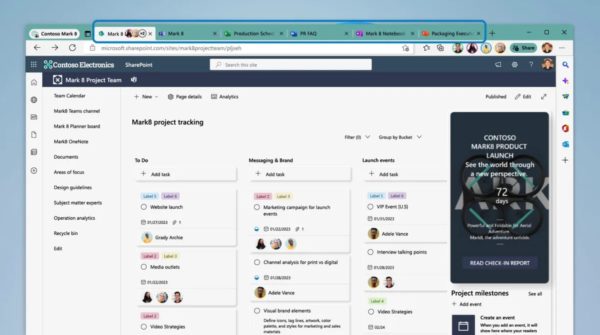
Now in preview Microsoft Edge Workspaces is a new shared space consisting of a set of browser tabs. Using this Workspace, groups will be able to view the same sites and documents in one place. Workspaces will be particularly handy when it comes to onboarding a team member into a project. Instead of sending them multiple links and files over email/chat, you can direct them to the shared space, where they’ll find everything in one place. A bonus is that tabs are updated in real-time, keeping everything and everyone up to date.
2) MICROSOFT PLACES

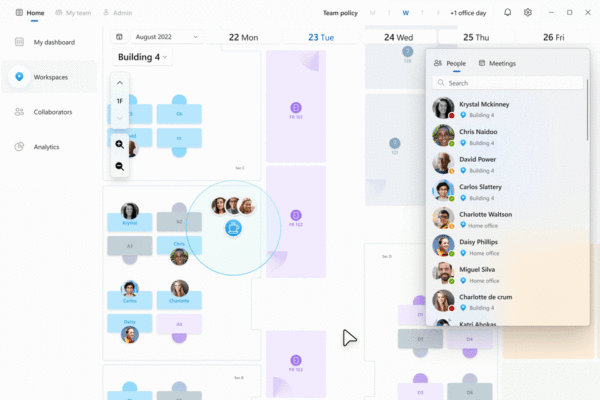
To support employees working both in the office and at home, Microsoft is creating a new category of technology solutions under the ‘Connected Workplace’. The Connected Workplace equips modern workplaces with the technology needed for employees to achieve the best results. To optimise spaces for hybrid work, Microsoft will roll out a new workplace app called Microsoft Places. This app will use intelligence to support where work is taking place and will focus on connecting digital and physical spaces:

• A dashboard view of days people are in the office

• Physical location indicator (in office, remote or mobile)

• Hot desk booking: seeing which workspaces other employees have booked (so you can potentially book one nearby)

• Insights and guidance on commuting time

• Wayfinding: Access directions on your mobile device to find the right office location
3) MICROSOFT VIVA

Microsoft continues to invest in Viva through a series of new capabilities across the Viva Suite. Here are some of the Viva product announcements we’re excited about:

Viva Learning will become more discoverable with the ability to view assigned learning directly from the Viva Connections dashboard and in the daily Viva email. New learning features include learning paths for sequenced groups of training, learning collections for personal collections of learning content and permissions to allow admins to configure permission access to learning content.

New features in Microsoft Viva Insights to help users improve personal, team and organisational productivity and well-being. Some of these updates include meeting effectiveness surveys, schedule send suggestions, focus mode experience and quiet time settings.

New third-party integrations for Microsoft Viva Goals to bring purpose and KPIs / (OKRs) into the flow of work

Greater intelligence for Viva Topics to organise content across systems and identify experts. Highlights include Viva Topic cards surfacing in the Outlook app for Windows and Viva Topics finding relevant people, routing questions and answers and automating answers in conjunction with Viva Engage.

4) MICROSOFT OUTLOOK

To help people stay organised and connected with hybrid work, Microsoft has added some new features to Outlook. Employees can organise their working week by indicating which hours they’ll be available and where they’ll be working. “Meeting recap” allows employees to easily access details about a meeting and the recording from the calendar event. To account for different time zones and employee off-hours, messages can be scheduled to be sent later.

5) TEAMS PREMIUM

From December, a new Microsoft Teams Premium add-on will be available in December 2022. Teams Premium is designed to make every meeting more personalised, intelligent and secure. Features include:

Video clips: short, rich video snippets that can be recorded, sent, viewed and replied from desktop or mobile. These are designed to strengthen connection and add a more personal touch

Expanded reactions: With over 800 Teams emojis, employees can express themselves in multiple ways

Suggested replies: Using machine learning, responses will be generated that are most relevant to the group conversation. Users will have access to one of three generated responses to make replying more productive.

Schedule send: Manually choose a future date and time for a chat message to be delivered.

Delete chat: Easily remove yourself from one-on-one or group chat conversations without affecting other participants

Zero-state people recommendations can start new chat conversations based on previous collaborations.

6) TEAMS MESH AVATARS

For those that are feeling a little camera shy, Mesh avatars are now available for Teams meetings in private preview. This will give employees the ability to choose to show up to a Teams meeting with a personalised, animated version of themselves – no camera needed.


7) TO DO

While To Do may be one of Microsoft’s lesser-known apps, this task-tracking app has several features highlighted at Ignite to help with productivity. You can:

Consolidate all your tasks from multiple applications into one app interface

Schedule time directly into your Teams or Outlook calendar to complete tasks

Convert a Teams message into a task

Virtual commute – three short steps that the system will walk you through to help you feel ready to log off.

8) MORE MICROSOFT IGNITE 2022 ANNOUNCEMENTS

To find the full list of Microsoft Ignite 2022 announcements, visit Microsoft’s Book of News. This is a comprehensive summary of all product announcements including everything from Azure to Dynamics 365.

If you’d like help understanding how to apply some of these new features to your organisation, to improve productivity, communication, engagement and collaboration, get in touch today.

SharePoint consultants at work

It can be a little hard to know where to start when it comes to looking to engage the services of a SharePoint consultant. With so many options available to you, what criteria should you be using to help decide which SharePoint consultant is right for your organisation?

Finding an external consultant, whether you have your own in-house team of experts or are completely starting from scratch, need not be impossible with these handy tips.

Experience

When considering the different options available to you for SharePoint consulting, it’s important to take into account an organisation’s or individual’s work history and experience. An organisation that has been in operation for 10+ years with an experienced team of SharePoint consultants, will be far more likely to solve your SharePoint problems (particularly, if they’re complex) than a graduate fresh out of university. You’ll also likely find that a more experienced consultant will be able to help with other complementary areas like the wider Microsoft 365 ecosystem and delivering value through other technologies like the Microsoft Power Platform. Why unnecessarily work with multiple consultants when you can direct your focus through one. While engaging with more experienced consultants may be more expensive in the short term, experienced SharePoint consultants will ensure your project gets done correctly and will likely save you time and money in the long run.

Location

In today’s hybrid work environment, it’s now possible to do business with someone from nearly any corner of the globe. However, there are benefits to working with a consultant in the same or similar location and time zone. This can make meetings far easier to schedule and can ensure that work gets actioned when urgent. In addition, a SharePoint consultant that’s located nearby can meet you for some needed face to face time, or even become a physical extension of your technical team.

Responsiveness

Once you’ve started engaging with a SharePoint consultant, how long are they taking to get back to you? Are you just another cog in a giant corporate wheel? It’s important that you work with consultants that are available and responsive as this will ensure that the work that you need is prioritised and completed in a timely manner. Consultants that are flexible and attentive to your business needs will be far more likely to deliver a positive and successful project.

Transparency

Ensure the consultant you engage is willing to supply a breakdown and timesheets for any work being completed. This provides full transparency around the project work and the time that it is taking to finish. Don’t settle for confusing timesheets and hard to decipher spreadsheets – make sure you can understand what you’re looking at. You might find you have some additional time left to allocate to your next SharePoint project.

Flexibility

Choose a SharePoint consultant that gives you a range of pricing options to suit your business needs. At WebVine, we offer our clients the option to scope out a piece of work and quote for the total project cost (often at a discount) or to purchase pay-as-you-go or prepaid hours. This flexibility in pricing ensures that business teams can budget accordingly and potentially allocate remaining annual budget into prepaid hours for the next annual or financial year.

Qualifications

There’s no doubt that SharePoint is a niche technical expertise. Hey, that’s why you’re most likely looking externally for some added support. Whether you’re dealing with migrating to SharePoint online, looking to undertake some SharePoint development work, or want to set up a new integration, dealing with an individual or team with the right qualifications will lead you down a path to success. Microsoft regularly offers added training and development courses with which your consultant should be up to date. If you’re looking at a SharePoint consultancy, check and see whether they’re a Microsoft Gold partner. This is a useful indicator that can highlight whether they’ve been completing a minimum level of training and upskilling.

Reputation

Reviewing testimonials from previous clients is a great way to gauge what your project might be like with a potential SharePoint consultant. Find out about the types of organisations that your consultant has worked with and see whether they’d be willing to put you in touch with any. At WebVine, we stand behind the work that we do and are happy to connect any potential clients with existing clients to instil confidence and alleviate any concerns. Take a look at some of our client work to see what we’ve been able to achieve.

Why waste time looking for a SharePoint consultant when we’re right here to help with your next project. At WebVine, we have a team of experienced SharePoint consultants ready to assist you. We offer a personalised and flexible approach designed to deliver you the best results.

  Get in touch for a friendly chat